What Does That Little Hole Next to a Smartphone’s Charging Port Do—and Why Is It So Important?
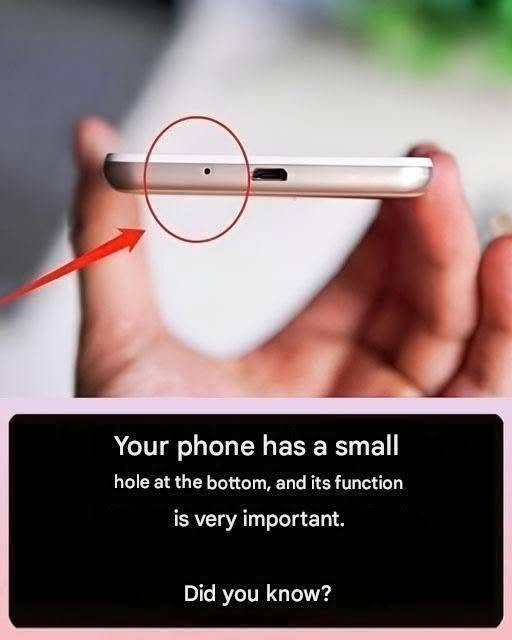
If you’ve ever looked closely at the bottom of your smartphone, you’ve probably noticed a tiny hole next to the charging port. Many people mistake it for a reset button or think it’s part of the speaker, but it actually serves a very different purpose.
That small opening is typically the primary microphone, and it plays a vital role in how your phone captures your voice during calls, voice recordings, and video chats.
It’s Not a Reset Button
One of the most common misconceptions is that the tiny hole is a hidden reset switch. Unlike some older electronic devices, modern smartphones generally do not have a reset button hidden inside a small hole near the charging port.
Inserting a paperclip, SIM eject tool, toothpick, or pin into this opening can damage the delicate microphone inside. If your phone isn’t responding, use the device’s button combination or software settings to restart or reset it instead.
What the Microphone Does
The primary microphone is responsible for picking up your voice when you:
- Make phone calls
- Record voice memos
- Record videos
- Use voice assistants
- Join video meetings
- Send voice messages
Without it, callers may have trouble hearing you clearly, and audio recordings could sound muffled or distorted.
Why Some Phones Have Multiple Tiny Holes
Many smartphones include more than one microphone. Each has a specific purpose.
For example:
- The bottom microphone is usually your main speaking microphone.
- A top microphone often helps reduce background noise during calls.
- Additional microphones may improve stereo audio recording or enhance voice recognition.
These microphones work together to make conversations and recordings sound clearer.
How Noise Cancellation Works
Modern smartphones use multiple microphones to distinguish your voice from surrounding sounds.
During a phone call, one microphone focuses on your speech while another detects background noise such as traffic, wind, or conversations nearby. The phone’s software then reduces much of that unwanted noise, helping the person on the other end hear you more clearly.
Keep the Microphone Clean
Because the microphone opening is so small, dust, lint, or pocket debris can build up over time and affect sound quality.
To clean it safely:
- Use a soft, dry brush to gently remove debris.
- Blow away loose dust with a hand-operated air blower.
- Wipe the surrounding area with a clean microfiber cloth.
Avoid using sharp objects, compressed air at very high pressure, or inserting anything into the hole, as this can damage the microphone.
Is the Hole Waterproof?
On many modern smartphones with water-resistance ratings, the microphone opening is protected by fine internal membranes and seals designed to help keep water out while still allowing sound to pass through.
However, water resistance is not permanent. Over time, normal wear, accidental drops, or repairs can reduce a phone’s resistance to water. It’s still best to avoid exposing your phone to unnecessary moisture.
What If People Can’t Hear You?
If callers frequently say your voice sounds faint or muffled:
- Check for lint or debris blocking the microphone.
- Remove any phone case that may be covering the opening.
- Restart your phone.
- Test the microphone using the phone’s voice recorder.
- Install any available software updates.
If the problem continues after cleaning and troubleshooting, the microphone may require professional repair.
The Bottom Line
That tiny hole next to your smartphone’s charging port may look insignificant, but it’s one of the device’s most important components. It’s usually the primary microphone that captures your voice for calls, recordings, and voice commands. Treat it with care, keep it free of debris, and never insert pins or other objects into the opening—doing so can permanently damage the microphone and affect your phone’s audio performance.